
Using spellcache › Sharing
Sharing
Shared collections
A collection is a shared space, not a single account’s property. Every account starts with its own; you can create more (Settings › New collection) and switch between those you belong to (Settings › Switch to).
Each collection has one Owner and any number of members:
| Role | Can |
|---|---|
| Owner | Everything, plus manage members, rename, publish links, transfer or delete the collection |
| Contributor | Add, edit and remove cards, binders and decks |
| Guest | See everything, change nothing |
Add a member
As the Owner, open Settings › Collection › Add a member:
- Type a username (existing accounts are suggested) or an email.
- Choose Contributor (default) or Guest.
- Tap Add, or Invite for an email address.
Inviting an email with no account creates one and sends it a sign-in link, but only when the Owner is an administrator or sign-ups are open on the server. Otherwise, ask an administrator to invite the person first.
Tap a member to change their role or remove them. Danger zone holds Leave collection, Transfer ownership (you stay on as a Contributor) and Delete collection.
Public links
Decks and binders can be published by link. Only the collection’s Owner can do
it: ··· › Share › Make it public, then Copy link. The address
looks like https://your-server/s/<id>.
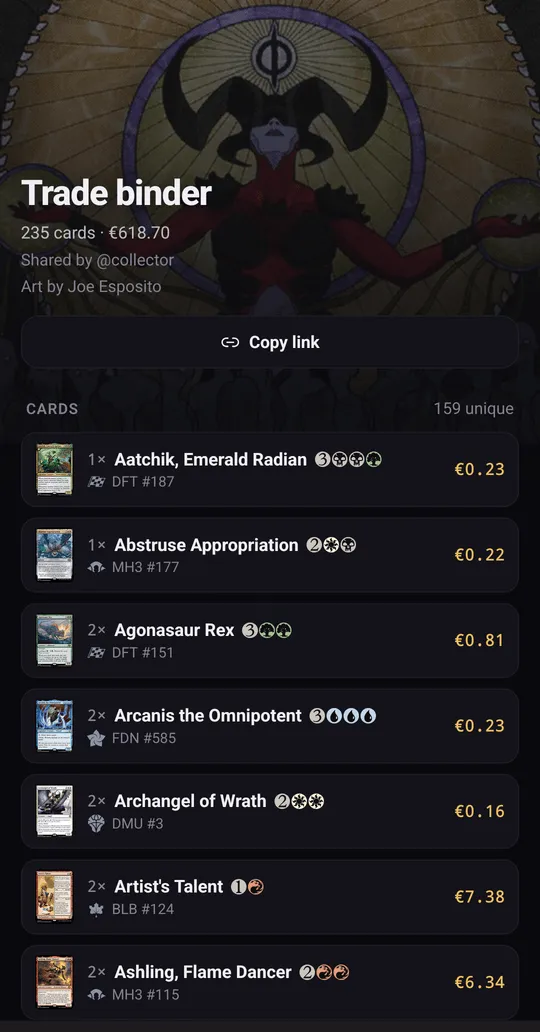
Anyone with the link, without an account, sees:
- the name and the cover;
- the card list with quantities and prices, and the total value in the owner’s currency;
- who shared it, and the deck’s status for a deck.
The rest of your collection, the copies you own elsewhere and the cards you are still missing stay private. Remove share takes the page down at once: the link then answers “not found”.
Public pages must stay reachable without signing in. Scryfall’s terms do not
allow card data behind a login, so a server should not put an access filter in
front of /s/ (see Reverse proxy).